Over the past few weeks, I’ve been working on a new version control system (VCS) called ver (from the Latin ver, “spring”).
To clear the air immediately: ver is an alternative to git, not a replacement. It’s not compatible and I don’t intend to add compatibility beyond .gitignore files. If git is not a hard dependency for you, or if you’re curious of what alternative VCS are capable of, keep reading :)
In this blog post, I’ll talk about some technical details of ver, reflections that are coming up while building it, and the future I imagine for it.
One Interface to Rule Them All
When I started creating ver, I was pretty much anchored to the traditional idea of version control having to be offline-first.
The evolution of agentic coding, though, is demonstrating quite the opposite: we don’t have humans working on their local branches for hours and maybe pushing a few changes in a day to the remote copy, we have agents who can push hundreds of changes in a few hours, stressing the infrastructure underneath and causing issues.
In this sense, version control should adapt to live anywhere: locally, of course, because there are still humans who enjoy coding (myself included), but also online, in systems that have proved time and time again to be resilient to high traffic (such as object storage).
For ver, I needed two systems specifically:
- A filesystem API
- A key-value store API
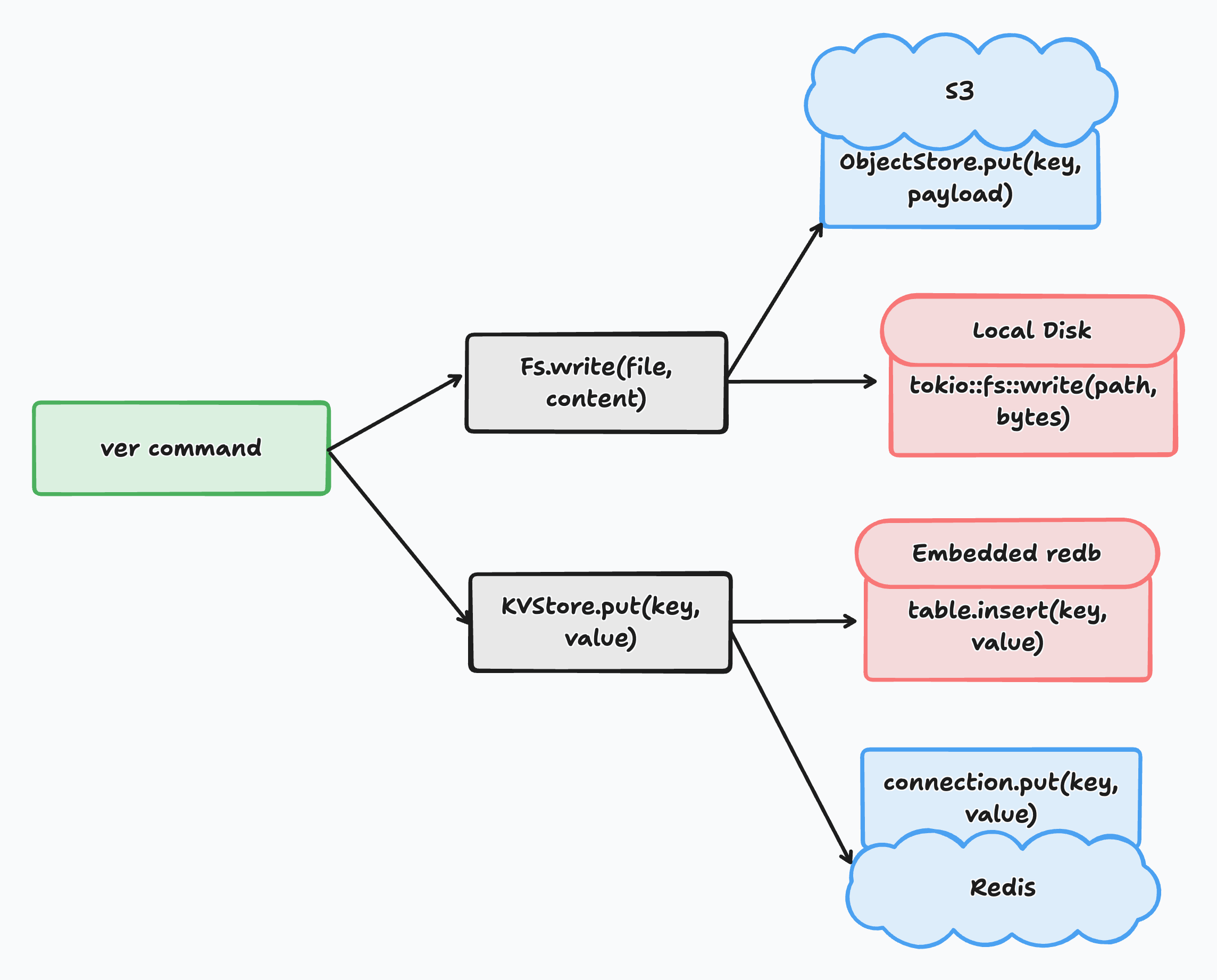
To cater to the needs of an online and offline VCS, I wrote two unified traits that could be implemented by different backends:
Fs, for filesystem operations. Async-first, supports reading/writing bytes, streaming, listing, deleting, copying and existence checks.
#[async_trait::async_trait]
pub trait Fs: Send + Sync {
    async fn read(&self, path: &str) -> Result<Bytes, FsError>;
    async fn write(&self, path: &str, data: Bytes) -> Result<(), FsError>;
    async fn delete(&self, path: &str) -> Result<(), FsError>;
    async fn list(&self, path: &str, walker_fn: Option<Walker>) -> Result<EntryIter, FsError>;
    async fn create_dir(&self, path: &str) -> Result<(), FsError>;
    async fn exists(&self, path: &str) -> Result<bool, FsError>;
    async fn stream_read(&self, path: &str) -> Result<BoxReader, FsError>;
    async fn copy_dir(
        &self,
        dest: &Arc<dyn Fs>,
        path: Option<&str>,
        ignore: bool,
    ) -> Result<(), FsError>;
    async fn copy_files(&self, dest: &Arc<dyn Fs>, paths: Vec<&str>) -> Result<(), FsError>;
}KVStore, for key-value store operations. Supports putting and getting different types of data, as well as copying the contents of a KV store to another KV store.
pub trait KVStore: Send + Sync {
    fn get_snapshot(&self, key: [u8; 32]) -> Result<Option<Bytes>, KVError>;
    fn put_snapshot(&self, key: [u8; 32], value: &[u8]) -> Result<(), KVError>;
    fn get_name(&self, key: &str) -> Result<Option<[u8; 32]>, KVError>;
    fn put_name(&self, key: &str, value: [u8; 32]) -> Result<(), KVError>;
    fn get_merge(&self, key: &str) -> Result<Option<Bytes>, KVError>;
    fn put_merge(&self, key: &str, value: &[u8]) -> Result<(), KVError>;
    fn delete_merge(&self, key: &str) -> Result<(), KVError>;
    fn copy(&self, dest: &Arc<dyn KVStore>) -> Result<(), KVError>;
}
The concrete implementations for Fs are DiskFs (local disk, which uses tokio::fs for async operations) and ObjectStoreFs (remote object storage, backed by the object_store crate).
For KVStore I added RedbStore (embedded redb database) and RedisStore (Redis server).
No matter which implementation is tied to you current setup, the interface is the same: in this way, whether your files live in Azure Blob or on your SSD, whether you want an embedded or Redis-backed KV, the consumer (the command you use ver with) always uses the same code.
This choice is motivated by one main idea: operations such as copying a remote repository to your local one (git clone/pull) or pushing a local repository to its remote (git push) are now a simple copy operation on the same project between two different filesystems and KV stores.
Of course, there are optimizations (we don’t copy the full repository every time, if we don’t need to), but the idea that syncing repositories is just a matter of copying their contents is central to ver.
A Note on Async
Async in Rust has some notorious problems. One of them is that, as of the time of writing (rust 1.99 and 1.100, and prior versions), the compiler doesn’t really do a great job optimizing async code, which can bloat your binaries a little bit.
ver, though, needs asynchronous code: most of its commands involve I/O (over disk or network), and most of them can benefit from the concurrency model that Tokio tasks offer in Rust.
At the same time, we want to avoid bloating in our binary deriving from async usage, so what do we do? We isolate async code and make it run in its own runtime.
Using a global tokio::Runtime, we can easily do rt().block_on() or rt.spawn() on many async tasks and wait for them blockingly.
Someone could object: isn’t that just too complicated? It would be easier to just do
std::fs::write(file, content)Rather than
rt().block_on(async { fs.write(file, content).await })Taken individually, this case might seem to make sense, but most operations in ver involve many files at once: with a blocking interface, I wouldn’t be able to batch and concurrently excute more than one operation inside my functions, and I would have a little harder time when spawning tasks through channels and collecting them as they finish executing while maintaining bounded concurrency.
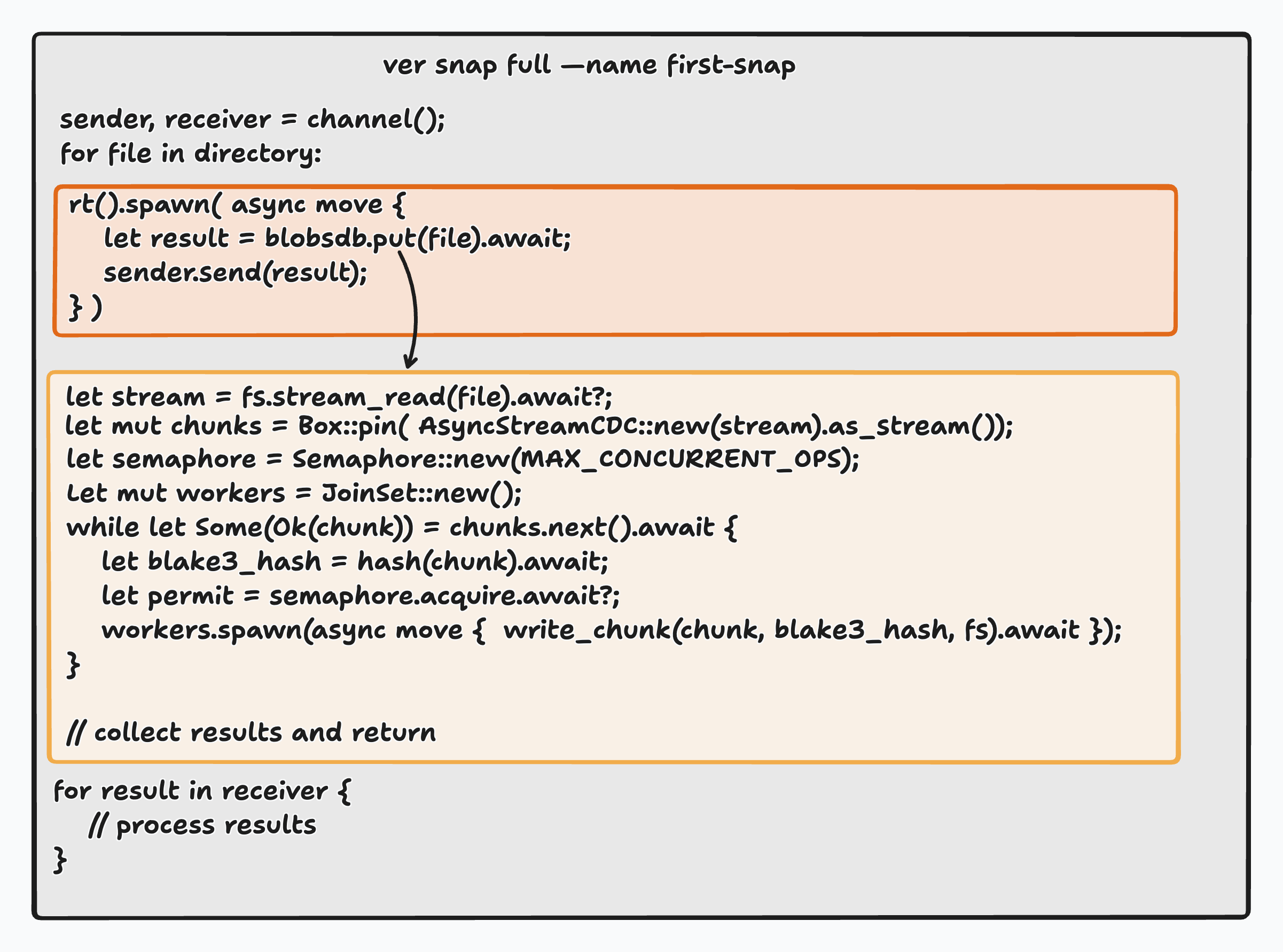
Let’s take, as example, the write path: when a full snapshot is taken, many files need to be stored in content-addressed storage (see below).
Storage is not plain, though: each file is divided into smaller parts through content-defined chunking, and every chunk has to be compressed (using zstd) and written to storage.
Inside a single put called on a file, the following things happen:
- The file is streamed from the filesystem. This happens so the CDC algorithm can chunk in streams and doesn’t have to process the file all at once
- Chunks are streamed from the chunker to the compression workers
- Workers (organized through a
JoinSet) pick up chunks, hash them (using blake3), compress them with zstd and write the compressed version under the content-addressed storage prefix using the hash as file name.
So we can operate with concurrency at two levels: one inside the put call (chunks are independent, they can be processed concurrently), and one to concurrently store all the files in the full snapshot.
That’s where async shines: within put I can use JoinSet, and in the sync call (the one from ver snap full) I can use a multiple-producer-single-consumer (mpsc) channel + a semaphore to spawn all puts and retrieve them from the channel receiver at the end.
All of this happens within the async runtime, but the function that calls it is not a future: pretty cool, isn’t it?
Content-Addressed Storage
When I started developing ver, I was using RocksDB for blob storage.
RocksDB only has a synchronous interface and, above all, was most definitely an overkill for just blob storage.
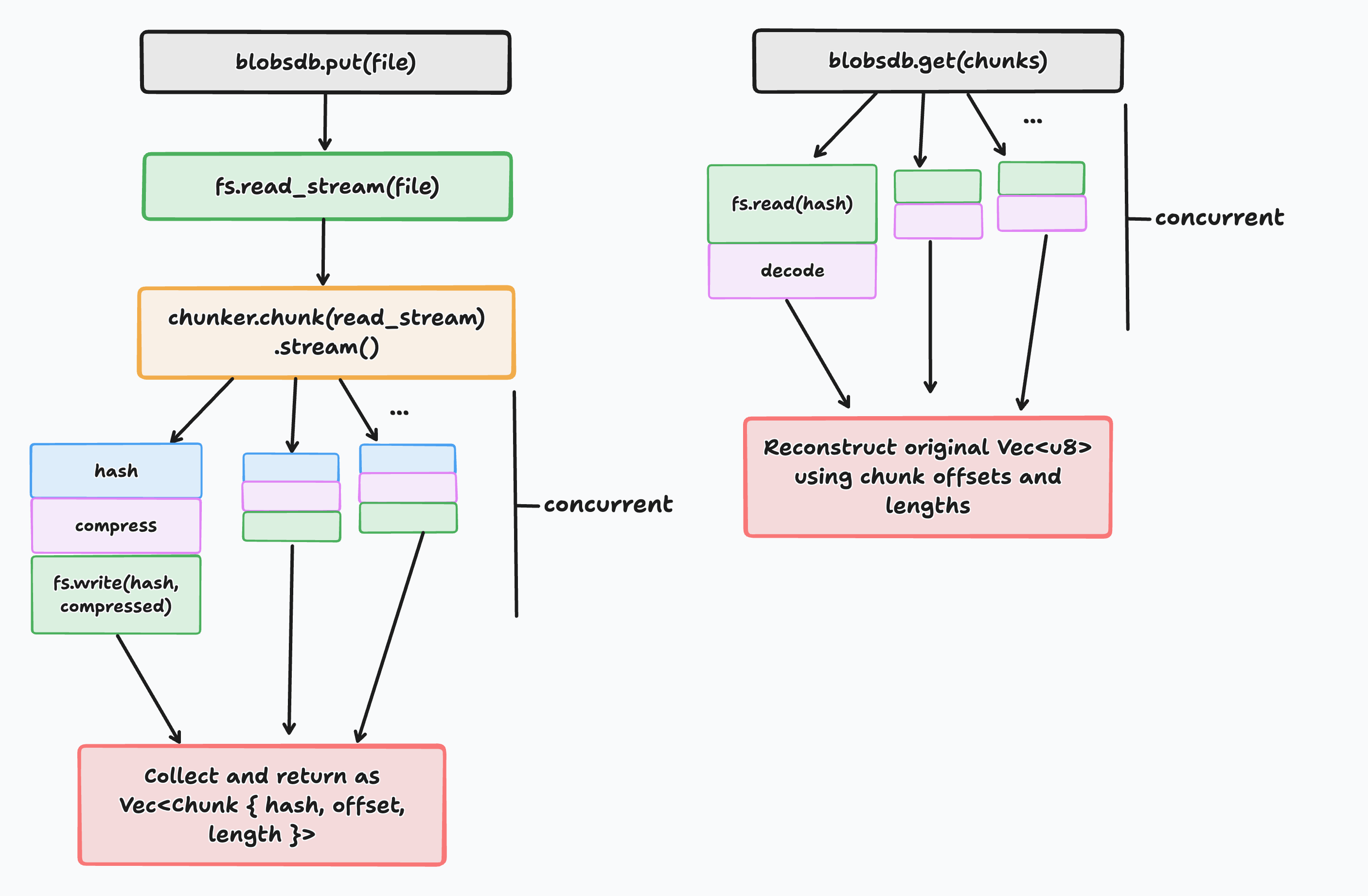
So I resorted to custom-made software: my ver-blobsdb is a content-addressed storage system built on top of the Fs abstraction, so that it can read and write from the same backend where the files are stored.
blobsdb, though, doesn’t follow the git storage pattern for blobs: files are stored plainly under .ver/blobsdb/ as content-defined chunks (created using fastcdc) and each chunk is addressed by its BLAKE3 hash and compressed via zstd.
To make sure this architecture didn’t come at the cost of too much storage, I ran this benchmark script to measure the time ver and git take to snapshot the qdrant/landing_page folder (1.128GB):
hyperfine \
  --warmup 3 \
  --runs 20 \
  --prepare 'rm -rf .ver .git; ver ctx init' \
  --cleanup 'rm -rf .ver' \
  --command-name 'ver snap full' \
  'ver snap full --name first'

hyperfine \
  --warmup 3 \
  --runs 20 \
  --prepare 'rm -rf .ver .git; git init -q' \
  --cleanup 'rm -rf .git' \
  --command-name 'git add' \
  'git add .'
ver took an average of 4.405s, while git of 22.653s, and ver produced a .ver directory only 10MB larger than .git.
Chunks are then associated with the path they come from in something called a Snapshot (see below) and this is serialised, compressed to bytes and stored, alongside with its BLAKE3 hash, in the KV store (this happens outside of blobsdb, which only deals with one file at a time).
When it’s time to reconstruct a file, blobsdb gets a vector of chunks and reads them from their content addressed location in order of offset, reconstructing the file bytes. Also here, it takes advantage of async concurrency.
Snapshots Are The Base Unit
As mentioned above, a Snapshot is the base unit of work for a ver project: it stores the state of its contents at a given point in time, and can be as granular as you want it to be.
It is defined as:
pub struct Snapshot {
    pub repository_state: HashMap<String, Vec<Chunk>>,
    pub parent_ids: Vec<[u8;32]>,
    pub partial: bool,
}
The state maps a file path (a real path on the filesystem, a key in object storage) with the chunks derived from the file itself. Along with the state, each snapshot points to its parents (one parent under normal circumstances, two in the case of a merge - see below).
As said before, you can take a full snapshot of a project:
ver snap full --name first-snapshotOr just of a few files:
ver snap from --file README.md --file src/main.rs --name cli-args-nitsIn the second case, partial is set to true: if you want to go back to a partial snapshot, only the involved files get restored (under normal circumstances, all files that currently exist and that are not part of a snapshot would be deleted).
As for branches and commits in git, you can roll back to a specific snapshot. To avoid users and agents to use snapshot IDs, you associate a name to each snapshot, so that you can do:
ver goto first-snapshotThis command fetches the snaspshot, which is stored as compressed bytes in the KV store, deserializes it, walks the repository state map reconstructing files from blobsdb, and writes them back. As said, files that are not in the snapshot get deleted, unless you pass --no-delete. As per snapshots themselves, a rollback can be as granular as you want, and you can just rollback a handful of files instead of the whole project.
I find this to be particularly useful for agents: they take an initial snapshot, then a series of intermediate snapshots while the project progresses, and you (or them) are able to keep certain files and roll back to previous versions for certain others, then start again from that base and save them to other snapshots, and so on. You can even see how a file used to look like at a specific snapshot without having to roll back to it, using the show command, or diff a file between two snapshots using the diff command. You can do as much exploration as you want with your herds of agents: the state of your repository won’t get lost.
Contexts, Not Repositories
Like kubectl, ver has contexts, which sit in between the idea of repository and remote for git.
A context consists of settings that define which filesystem and key-value store backend can be used for one of your projects. You can have multiple contexts associated to the same project (like multiple origins, in git), but only one project per context (in this sense, we can say it’s similar to a git repository).
Contexts are stored in ~/.ver/contexts.toml and you can add/replace/switch between them:
[fs]
project-local = { base_directory = "/Users/user/projects/project" }
project-backup = { access_key_id = "...", secret_access_key = "...", endpoint = "...", region = "...", bucket = "project" }

[kv]
project-local = { redb_path = "/Users/user/project/.ver/kv.redb" }
project-backup = { uri = "rediss://..." }

current = "project-local"
I find a context to be the best way to define and manage different backends for the same project, as it would be definitely non-ergonomic (and also token inefficient) to have to specify the connection details for your remote object storage every time you want to sync with it.
Sync and Merges
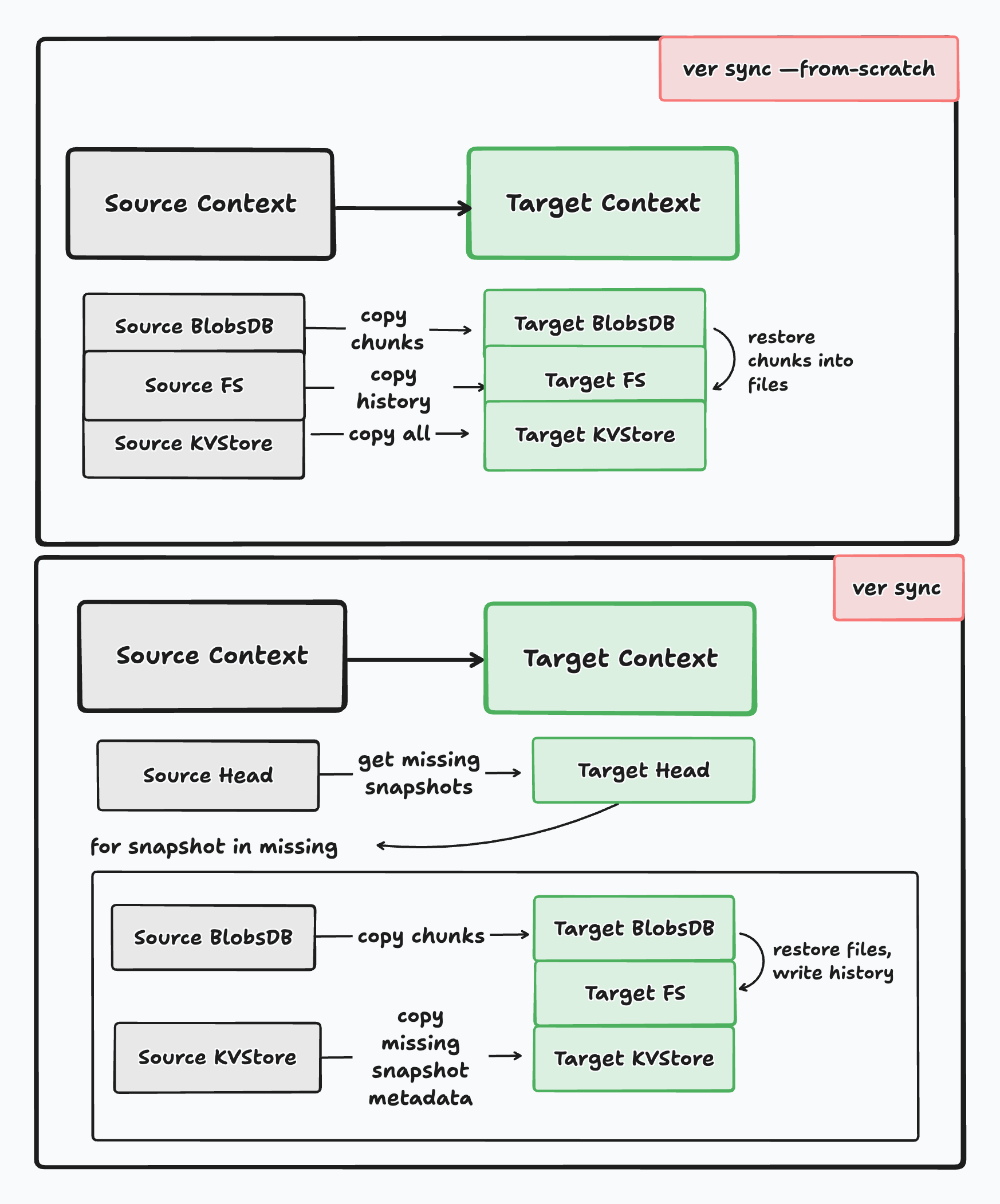
An important concept that I expressed at the beginning of this blog post is that git push, clone and pull are simply copy operations between versions of the repository that exist in two different places.
With contexts allowing you to specify where your copy of the ver project live (disk or object storage, embedded redb or Redis), and the code underlying being essentially the same, syncing and merging is all just a matter of copying snapshots between Fs and KvStore implementations, although, of course, with some differences.
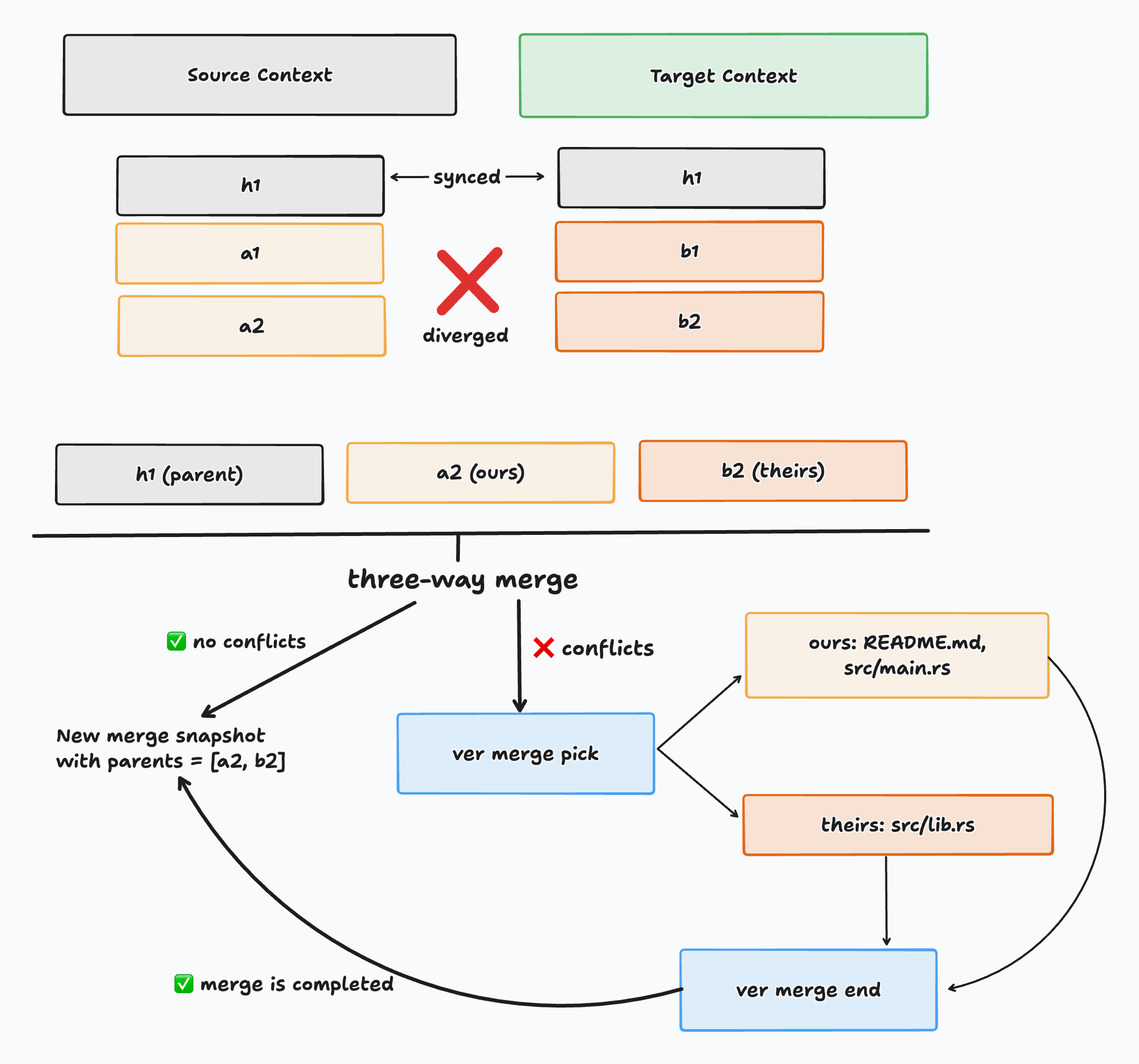
ver sync is an intersection between a clone and a push: it can be done --from-scratch, where it copies the entire content of one context to another, and it can be done simply diffing the heads of the source and the target context, but only at one condition: they must not have diverged (meaning the head of the target context must be an ancestor of the source context’s head). Now, sync is kind of interesting, because it goes two ways: instead of having a pull mechanism to get the changes from the target context to the source, you just switch the roles and run sync again. Where git uses three commands, ver does it with one and, again, this is all rooted in the fact that we used shared interfaces for different backends, so there’s no difference in how contexts behave, independently of their placement.
ver merge does a three-way merge of contexts that share a portion of their snapshot history, but that have diverged: if the merge is clean, it succeeds on the first go, if not it gets stored as partial merge and rejected and, with ver merge pick, you can pick the version of the file that you want to keep in the merge and resolve conflicts interactively. Now: ver merge pick is pretty tedious to run manually if you are a human and have conflicts on many files, but if you’re an agent there’s no problem in just going through the conflicts highlighted by the merge, picking sides and resolving with ver merge end.
I have to say, this is something particularly liberating: knowing that most of my users will be agents frees me from having to design interfaces meant for slow and lazy consumption (I’m the first to admit that I love when an interface allows me to be lazy, as a human): agents are extremely fast at producing code and extremely eager to get to the solution of a task, so you can throw things at them that are more complex and require a little more effort. This doesn’t mean I want you to do all your work with agents: ver is agent-aware, but it isn’t agent-only. Human engineers, for decades before AI, have learnt much more complex and more challenging things that ver merge pick (like writing Rust), so I am confident that anyone, flesh or silicon, will be able to do merges in ver.
How Will ver Work Tomorrow
As of today, ver works in a highly decentralised way. It doesn’t matter where your objects reside and where you’re executing commands from: as long as the context exists, ver will always work. There is no central server or single source of truth where operations like merges or copies are processed.
Although this is already something I am satisfied with, I want to create a platform where I can share my projects with other people. As of now, two people wouldn’t be able to collaborate on the same project with ver, unless they have access to the same S3 or disk.
That’s why I would like to create the missing layer as well: a server (with attached UI) that can manage one remote copy for you.
It would work in this way: once you’re authenticated, the server will use your user ID as a namespace for object storage, and will create a bucket for each of your distinct projects under that. When you want to sync, you will go through the server, which will also take care of merge requests and reconciliation, as well as streaming data to destination when you (or another user) want to make a copy of the project.
Of course this introduces a series of other problems: if me and/or my team are the only people with access to credentials for object storage, it’s not a problem to also store secrets in my projects, since we already have a security shield one layer up. When it comes to a server that multiple users, also potentially unrelated, are using, things become a bit trickier: my approach there will be to allow the storage of encrypted secrets. Similarly to how sops works for GitOps secrets, you would use an age public/private key pair to encrypt and decrypt your secrets. You would then securely store the key pair also in the server, associated to your user identity, and would only give access to that key to other users you trust, so that they can access your secrets without you ever sharing them in plain text.
I have a few more ideas in mind, but they are still not as sharp as the ones I just wrote about: I am sure, though, that after I complete the single-node server, I will start working on a distributed deployment mode. All open source and self-hostable, of course.
Try Out ver Today
So, I think I might’ve bored you enough with details and reflections on ver: if you want to try it and you have cargo installed, you can:
cargo install ver-vcs --version 0.2.1-alphaOr you can use the install script, if you’re on Linux or Mac:
# latest
curl -fsSL https://raw.githubusercontent.com/AstraBert/ver/main/install.sh | bash
If you’re on Windows, you can download the latest executable from here.
Or give this prompt to your agent:
Install and set up ver from https://ver-vcs.net/llms.txtAnd, if you’re curious to know more about the command itself, you can visit the documentation.
Hope you enjoy ver and, as always, if you have issues or proposals for improvement, the project is open source and you can find it on GitHub and, hopefully soon, it will be on a ver server as well :)